



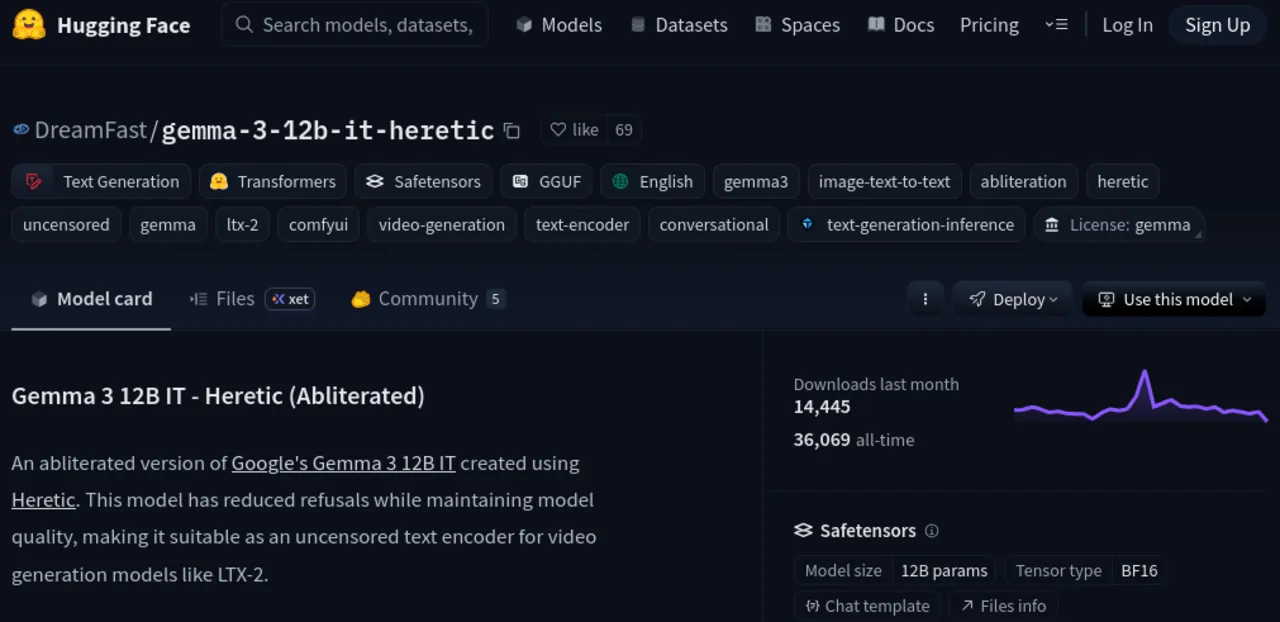
HuggingFace model pages only show downloads from the last 30 days. That number goes up and down as a rolling window, and it hides the real impact of older models. I built HF All-Time Downloads , a browser extension for Chrome and Firefox that surfaces the all-time download count directly on the model page.
The Problem
Go to any model on HuggingFace and you see “Downloads” with a number. What that number actually represents is downloads in the last 30 days, a rolling window. For a model released last week, that number is close enough to the total. For a model released two years ago, it tells you almost nothing about how many people have actually used it.
This matters because download count is one of the few signals people use to judge a model’s reliability and adoption. When you are comparing two models and one shows 500K downloads and the other shows 2M, you would probably lean toward the 2M one. But what if the 500K model was released a month ago and the 2M model has been around for three years? The 30-day window distorts the picture.
The all-time number does exist in the HuggingFace API. It is just not shown on the page.
People Have Been Asking For Years
This is not a new complaint. The community has been asking for better download statistics since at least 2022.
In May 2022 , a user reported that download statistics were only showing two weeks of data due to a recurring bug. They were running monthly scripts to manually log their organisation’s model downloads. People were already building their own tools to track this because the website did not show what they needed.
In June 2023 , a user requested detailed download statistics for building a trending models page, similar to GitHub’s trending page. They pointed out that monthly-only counts lack the granularity needed to track adoption. That issue is still open as of 2026.
In June 2024
, HuggingFace staff member osanseviero opened an enhancement request to support downloadsAllTime in the Python library, calling it “a frequent request.” The issue was closed after the API parameter was added to the library. The API now exposes the data. The website still only shows the 30-day window.
So the data is there. The API supports it. The community has been asking for over three years. Nobody built a tool to surface it on the actual model pages until now.
No Similar Tool Exists
I searched before building this. On the Chrome Web Store, searching for HuggingFace-related extensions returns things like “Download Repo as ZIP” and “Huggingface2PDF.” Nothing related to showing download statistics. On GitHub, searching for HuggingFace download count tools returns zero repositories. On Firefox Add-ons, same story. This extension is the first and only tool that puts the all-time download count directly on the HuggingFace model page.
How It Works
The extension is a single content script. No background script, no popup, no options page. It runs when you visit huggingface.co and does the following:
- Detects whether the current page is a model page by parsing the URL path
- Extracts the model ID from the URL, like
google/gemma-3-12b-it - Fetches the all-time download count from the HuggingFace API using the
?expand[]=downloadsAllTimeparameter - Compares it with the monthly count already shown on the page
- If the counts differ, injects the all-time count on a new line below the monthly metric
The extension only makes requests to huggingface.co. No analytics, no tracking, no external services.
Caching
Results are cached with an LRU cache, 5-minute TTL, max 50 entries. Navigating between model pages does not re-fetch if the cache is still valid. This keeps API calls minimal and avoids rate limiting.
SPA Navigation
HuggingFace uses client-side routing. Clicking between model pages does not trigger a full page load. The extension handles this with a MutationObserver that detects URL changes and re-runs the injection logic. There is also an AbortController to cancel in-flight API requests when the user navigates away before the response arrives.
Rate Limiting
If the API returns HTTP 429, the extension retries up to 3 times with exponential backoff at 1s, 2s, and 4s. For 404 and 403 responses, which indicate private or deleted models, it skips silently.
XSS Safety
All DOM injection uses createElement and textContent. No innerHTML anywhere. The extension does not parse or render any HTML from the API response.
Installation
Install from:
After installing, visit any HuggingFace model page. If the all-time download count differs from the monthly count, you will see it displayed on a new line below the existing downloads metric. If they are the same, nothing extra is shown to avoid duplicate numbers.
The extension is MIT licensed and the source is on GitHub .
Resources
- hf-totaldownloads - The extension source code
- Chrome Web Store - Install for Chrome
- Firefox Add-ons - Install for Firefox
- huggingface_hub#2325
- HF staff enhancement request for
downloadsAllTime - huggingface_hub#1520 - Community request for detailed download stats
- hub-docs#154 - Download statistics bug report from 2022